First look — why the OS skews everything
Pick yuh set good, because di operating system decide how di whole ting feel. When mi test sets and build apps, mi always start wid the OS — it shape app access, updates, and day-to-day speed. If yuh shop direct from a tv manufacturer, check if dem lock di UI or mek yuh add third-party apps. At CES in Las Vegas, television manufacturers showed how platform choices change user experience, and dat real-world signal matter when comparing options.
App ecosystem: breadth and real availability
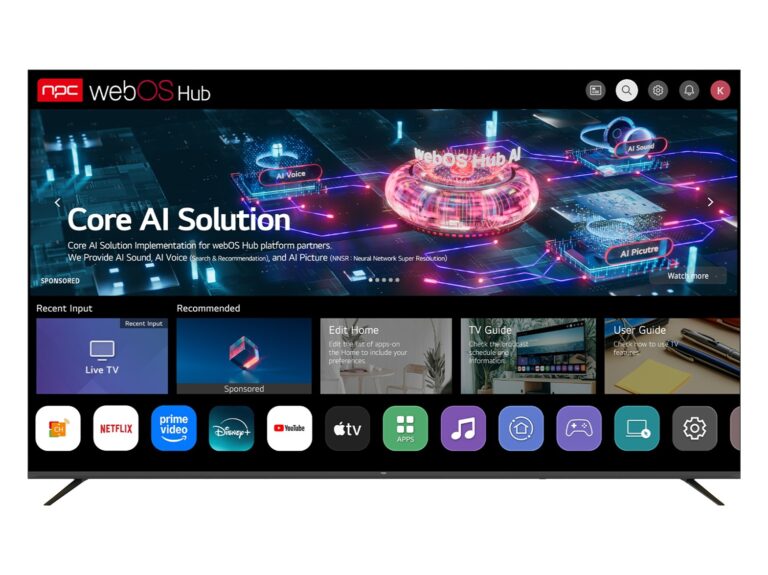
Look past marketing names. A big app store sweet, but what matter be whether the streaming apps yuh need actually run well and get regular updates. Android TV / Google TV and Fire TV have wide developer support; Roku keep nuff local apps in some markets. Ask: which apps get priority updates? Which ones break on your region? That answer decide user happiness faster than screen specs.
Update policy and vendor support
Updates mek di TV remain safe and fast. Some brands promise OS updates for years, others stop quick. Ask for the update cadence: monthly security patches, major OS versions every couple years, or silence after shipment. Vendors who publish clear support windows save yuh headaches later.
Performance, codecs and actual playback
OS plus hardware equal real playback. Check hardware decoding support for HEVC, AV1, Dolby Vision, HDR10+. An OS might advertise support, but confirm with hands-on or lab tests — buffering, app switching, and startup time reveal the truth. Don’t assume same chipset behave same across brands.
Search, voice and input methods
Voice search and universal guides differ. Some OS tie deep into a specific assistant — Google, Alexa, or proprietary voice. Decide which ecosystem you want: voice that finds content across apps or voice that only control device settings. Remote design and input latency matter more for older users and gaming households.
Security, privacy and update transparency
Ask direct questions: does the OS anonymize telemetry? Is there an easy privacy dashboard? How are third-party apps sandboxed? Vendors who publish security whitepapers and patch notes show authority. Mi recommend documenting answers before purchase, not after.
Customization, developer tools and integration
If you plan to deploy branded apps or custom UI, check available SDKs, web runtime support, and developer community size. Android-based platforms usually give broader tooling. Proprietary systems may offer deep integration but restrict how much yuh change. Balance control against speed-to-market.
Regionalization and language support
Not every OS handle locales equally. Subtitles, regional apps, input methods and app payment flows can vary. Confirm that the OS supports your language, local streaming services, and broadcast standards before committing.
Costs, licensing and hidden fees
Free OS don’t always stay free. Licence fees, mandatory app storefronts, or paid manufacturer services can appear later. Get itemized cost expectations: per-device royalties, app certification fees, and required cloud services. Clear numbers avoid surprises.
Common mistakes buyers make
Buying by brand name alone. Counting CPU cores without checking decoding support. Assuming all remotes perform equal. Trusting that an OS will keep getting updates just because it’s popular. These slip-ups create buyer regret fast.
Decision rubric — compare like-for-like
Score candidates on app completeness, update policy, codec support, security transparency, developer access, and regional fit. Weight what matter to your users: streaming families need app breadth and voice; hospitality deployments need manageability and control. Use hands-on testing where possible — screenshots and specs lie more than a quick demo.
Short alternative checks
If you can’t get your top pick, pick the next best on the specific axis that matters to you. Need low-cost global app access? Favor Android-based builds. Want a simple, reliable UI for non-technical users? Consider Roku or a vendor with polished proprietary UI. Want deep device control? Seek platforms offering strong SDKs and enterprise tooling.
Wrap-up — practical next steps
Make a shortlist, ask vendors for update policies and codec support sheets, run a five-minute app-switch test, and verify local app availability. Mi years in testing and building smart TV interfaces show the right OS choice cuts support calls and keep users satisfied. If yuh need a partner who matches platform capability to manufacturin’ needs, check how npc align hardware and software choices to the real requirements — dem approach mek the comparison simple and practical.